Let’s be real, if your videos aren’t optimized with the right keywords, they’re not getting found. YouTube is the second-largest search engine in the world, and people go there to search for specific answers, tutorials, and product reviews.
Matching your content to how people actually search is non-negotiable; miss that, and the algorithm moves right past you.
The difference between getting buried and getting watched mostly comes down to the keywords you choose and how you use them.
If you're tired of uploading videos that get buried, this is the blueprint to change that. Let’s take a look.
TL;DR
- YouTube keyword research is not optional; if you skip it, you’re guessing what people want.
- Tools are categorized by purpose. They can help with idea generation or volume/competition data.
- Tracking analytics after uploading is crucial for refining keyword performance.
- Use YouTube-specific tools (not just Google ones) to get video search data, not blog-level fluff.
- YouTube’s autocomplete is a zero-cost tool that shows you what people are typing.
- VidIQ and TubeBuddy help track what’s trending, spy on your competitors, and score your keyword targeting.
- Focus on search intent. You’re answering viewer questions and needs, not just picking words.
- Long-tail keywords win. Short, broad terms have crazy competition and vague intent.
- Don’t just research, map keywords to every element: titles, descriptions, tags, even your first 10 seconds of script.
- Track results in YouTube Studio and adjust. Keyword strategy is not one-and-done.
- YouTube keyword research can be applied to YouTube Shorts, too.
Why Your YouTube Videos Get Buried Before Helping Your Conversions
Remember that there’s a fine line between getting swallowed up and getting views or conversions on YouTube. You could neglect the smallest tweak and have a video bring you no new subscribers or even some commenters.
What’s really causing the pain, though, mostly comes down to how you choose to use keywords in video titles, descriptions, and tags.
We’ve noticed that this is where companies get it wrong when getting into YouTube. They go in without a standard plan for optimizing videos, which makes them nearly invisible to the algorithm.
This is more important now because YouTube’s algorithm heavily favors search signals to show your videos in Search and Suggested categories. In fact, the “Recommended” category alone accounts for 70% of views on YouTube.
All of this means matching your content to how people actually search is non-negotiable. Miss that, and no amount of quality content can help you.
What is YouTube Keyword Research?
YouTube keyword research is the process of finding the exact phrases real people are typing into YouTube’s search bar. The goal is to use these phrases to optimize descriptions, titles, tags, and even thumbnails so that videos get more visibility and rank better.
Your job is to find out what the audience actually types. You cannot rely on assumptions here because keywords connect your video directly to search intent, and intent drives discovery.
If your title, description, and tags aren’t aligned with real user intent, YouTube won’t even run initial testing (more on that later) on your videos. And without that initial exposure, your chances of appearing in Search or Suggested results drop significantly.
In our experience, this step is where businesses stumble and get left behind by creators who take keyword research seriously. As a result, they get fewer impressions, fewer clicks, and no growth, no matter how good their video is.
If you don’t understand how keyword research works on YouTube, you’ll keep making content that doesn’t get seen. It’s that simple.
Daniel Batal from Tube Buddy shows you how to implement that kind of solid keyword research your YouTube videos crave:
Why Do Keywords Matter for Your YouTube Channel?
As we have mentioned earlier, YouTube is the second-largest search engine in the world.
This means tons of people are looking for videos about fitness, tech, fashion, and business every minute of the day.
Even right now, your ideal audience is looking for the kind of videos you’re posting.
So if you can spot the keywords they’re typing when they search, and build a strategy for your videos around those words, you’ll show up in the results of those searches.
To put it simply, you get more views, likes, and subscribers when you optimize your videos with the right keywords.
YouTube Keyword Research vs. Google Keyword Research
YouTube is not Google. Yes, both are search engines, but the user intent is different.
Google search prioritizes pages that answer questions quickly. Blogs, forums, and structured content dominate results because users often want fast, direct information.
YouTube works differently. It prioritizes videos that keep viewers watching. Engagement signals such as retention rate and session duration matter heavily.
For example, someone might search “best smartphones 2026” on Google to skim a list. On YouTube, that same person may prefer a detailed “iPhone 15 vs Galaxy S25 camera test” video. The goal here is information as well as engagement and extended watch time.
This is why you cannot rely solely on Google keyword data for YouTube SEO. The intent patterns, ranking signals, and performance metrics differ.
If you want your videos to rank, you need tools and data specific to YouTube search behavior. From what we have seen working with teams scaling on YouTube, using platform-specific keyword tools makes a measurable difference.
Search Intent and Audience Behavior in YouTube Keyword Research
Millions of people go to YouTube for an all-around experience. They consciously decide what to watch, learn, and act on what they see, rather than skim through words in a whitepaper online.
This is where growing teams mostly get confused.
They forget intent matters and focus more on volume. Always remember that it’s not just a numbers game on YouTube. Aligning your content with audience behavior improves your performance much better than churning out videos will
That’s why the right keywords typically reflect a specific need to understand or solve something. Think: “how to fix a blurry camera lens” or “budget meal prep explained tutorial”.
This isn’t just theory either.
“When finding keyword targets for YouTube, you have to remember the result for a user will always be video content, which means the search intent is often geared more towards educating. Common keyword variations that have greater search volume in YouTube search often include ‘explained,’ ‘101,’ ‘tutorial,’ and ‘how to.” Jane Javor, SEO Manager and Video SEO Solution Lead at NP Digital (per Neil Patel)
The bottom line is, you should start by understanding why someone would search your keyword, not just what they’re typing.
How YouTube’s Algorithm Uses Keywords
If you think keywords only belong in your video title, you're missing more than half the picture.
YouTube’s algorithm reads every corner of your content, and if your keywords are scattered or missing, it won’t know how (or where) to surface your video. Here’s a closer look at how the algorithm uses keywords:
Titles, Descriptions, and Tags
The algorithm wants to be on your side. That’s why it scans the keywords in your title, tags, and descriptions to understand who to show your videos to.
Your video’s title is the first place the algorithm looks when it wants to categorize you by topic. People call the title “the front door” because it opens up YouTube to you.
In fact, at least 90% of the top-ranked videos on YouTube have part of the target keyword in the title. That’s why we suggest stating your primary keyword here to tell the platform what to look out for.
Primary keywords in titles also make it easier for your target audience to know about your video.
Since title space is limited, the next best home for keywords is your description. The description allows you to naturally add your primary and secondary keywords.
In our experience working with various companies, weaving your primary keyword into the first 100 words of your description signals the algorithm to test your video with your intended audience first.
Remember: Don’t keyword-stuff, just describe your video using the phrases your audience uses. YouTube descriptions average 107 words, but 17% of videos ranking first have over 250 words in their descriptions. So the ‘real estate’ for keywords is limited already.
Lastly, tags still matter, even though they’ve taken a backseat to descriptions and titles. Use them to help clarify your topic and cover variations: common misspellings, alternate names, and adjacent search terms. They won’t make or break your ranking, but they support the bigger picture.
Captions and Transcripts
Yes, YouTube reads your captions, so you shouldn’t ignore them. Closed captions and transcriptions provide the algorithm with additional text to analyze.
This means more chances to associate your video with relevant keywords. Besides, 15% of American adults have hearing difficulties; that’s a massive audience you shouldn’t ignore.
Pro tip: Say your target keyword in the first 10–15 seconds of your video. If it's in your script and spoken early, it shows up in auto-generated transcripts. That’s real-time SEO baked into your audio.
We also recommend making your own custom transcripts. The accuracy of these transcripts is great for SEO and accessibility, rather than relying on low-accuracy automated transcriptions.
Engagement Signals (Watch Time, CTR, Comments)
This is what many creators don’t know: keywords bring visibility, but engagement brings ranking.
Once your video is live, YouTube tests it on a small audience based on your keywords and metadata. Then the platform watches how people react. Are they clicking on it (good click-through rates)? Are they satisfied (Watching all the way through)? Dropping a comment?
This is the initial testing we mentioned earlier. If the video does well, the algorithm gets the signal to show your video more in “Search” and “Recommended”.
And then the more engagement you get, likes, shares, etc., the higher YouTube ranks your video. That’s because better engagement tells YouTube your video delivers on the keyword promise.
So yes, keywords matter. But only when they lead to relevant, watchable content.
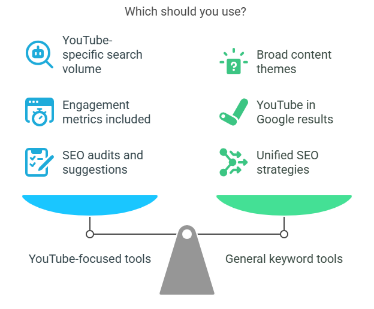
YouTube-Specific Keyword Tools vs. General Tools: Which Should You Use?
If you're serious about growth on YouTube, you need tools built for YouTube, not for blogs or e-commerce.
Here’s the more nuanced answer:
Key Reasons to Use YouTube-Focused Keyword Tools
General SEO tools can give you a rough idea, but YouTube-specific tools will give you tactical data. Let's see why they matter:
- They show search data tailored to YouTube, which eliminates Google spillover.
- They surface video competition levels, going beyond only considering keyword difficulty.
- They emphasize YouTube-specific ranking factors like average watch time, CTR, and engagement metrics.
- They come with creator-friendly extras: tag suggestions, SEO scoring, and title optimization.
- They help you align with YouTube’s discovery and recommendation systems on top of matching to ‘Search’.
Want to grow without making assumptions? Use tools built for the platform you’re publishing on.
When Is It Okay to Use General Keyword Tools?
General tools still have their moments. You can use tools like Google Keyword Planner or Ubersuggest when:
- You’re brainstorming broad content themes or campaign ideas.
- You want to find keywords that trigger YouTube video results in Google.
- You're building a multi-platform SEO strategy: website, blog, and YouTube included.
Quick heads up here: Don’t use these tools in isolation. Always circle back with a YouTube-specific tool to validate your final keyword list.
Step-by-Step Process for YouTube Keyword Research
Now let’s take these concepts from theory and apply them in the real world. If you’ve ever opened a keyword tool and didn’t know what to do next, this section’s for you.
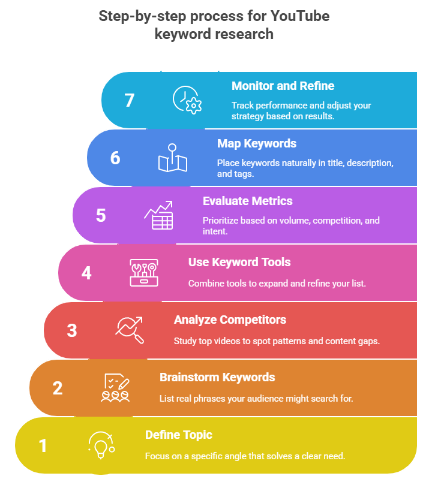
Step 1: Define Your Video Topic or Goal
Start with focus. Many businesses think YouTube wants to know only their target industry, so they leave titles as vague terms and move on. That’s where they get it wrong, because what the platform really wants to see is precise solutions.
In our experience, broad categories like “fitness” or “tech” get you nowhere. Drill down to a specific video angle.
So instead of “Fashion,” go with “Walking shoes for summer city travel.” And ditch “Cooking” for “Easy 10-minute high-protein breakfasts for beginners.”
Want a cheat code? Check your YouTube Analytics. What topics have already driven traffic to your channel? Double down on what works.
And always think in terms of your audience:
- What are they searching for?
- What problem are they trying to solve?
- What would make them click?
That’s your starting point.
Step 2: Brainstorm Seed Keywords
This may be low-tech, but it’s essential. Take your video idea and list every phrase that someone might search for to find it.
Use real-world language instead of industry jargon. Pull from YouTube comments, Reddit threads, your DMs, or customer emails. People will hand you keyword gold if you just listen.
Note: Questions = intent. And Outcomes = intent.
Also, ask yourself: what does the viewer want to achieve after watching this?
Here’s what you can write down at this stage:
- Variations on the topic.
- Pain points or goals.
- “How to” versions.
- Questions they’d ask in real life.
- The results they want.
The goal here is clarity. We’ve found that videos that don’t mirror their keywords with real search behavior end up at the bottom of the pile.
Step 3: Analyze Competitor Videos
Now that you’ve got a rough list of seed keywords, it’s time to see what’s already out there. Your competition has already done some of the work for you, so use it.
Search your topic directly on YouTube and check the top-ranking videos. What’s in their titles? What kinds of descriptions do they use? Are the video tags visible?
We also advise looking for patterns. Are they all using similar phrasing? That’s your first signal. ID’ing patterns also shows you what’s missing, and those gaps are opportunities you can easily pounce on.
Let’s say your keyword is “DORA metrics.” A quick YouTube search shows top-performing videos like “Measuring Software Delivery With DORA Metrics” and “The PROBLEM With DORA Metrics.” What stands out? Most of them lean heavily into opinion-driven or contrarian angles. This tells us there’s confusion, misuse, or flaws in the framework.
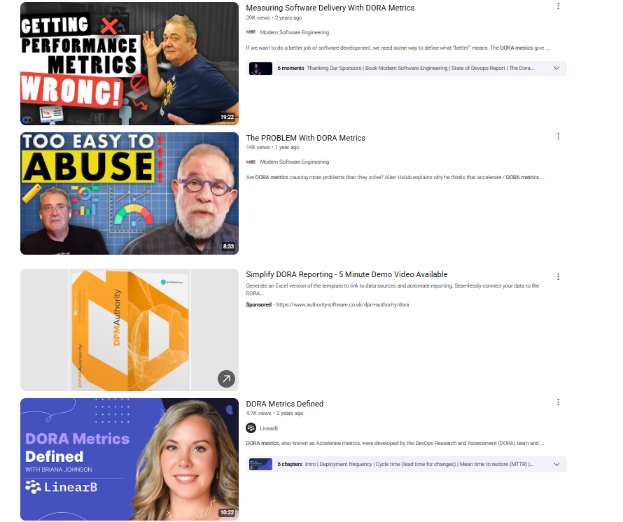
Also, notice how emotional framing (“WRONG!” and “TOO EASY TO ABUSE”) grabs attention. That’s a signal: controversial or contrarian hooks perform well here.
This is your first insight: educational videos that challenge the norm tend to perform well in this niche.
Another pattern? The top creators are thought leaders or consultants, so there’s space for a more polished, brand-backed explanation that still brings a strong POV.
And here’s the gap: none of these videos walk through real-world implementation or show practical dashboards. That’s your opportunity to position your video around something like “How to Actually Apply DORA Metrics (With Real Tools)” or “DORA Metrics in Action: A Practical Guide.”
At Bluethings, we always run this check with tools like:
- TubeBuddy (pulls video tags, SEO score, and thumbnail performance)
- VidIQ (shows keyword strength and rising search terms)
- TubeRanker (helps dig into their metadata and engagement)
If you find a high-performing video missing a long-tail variant (or fully failing to explain something), you just found your next video idea.
Step 4: Use Tools to Generate Relevant Keyword Ideas
Now it’s time to expand. You’ve got the angles, you’ve seen what competitors are doing, and now you need volume.
Start here:
- Type your keyword into the YouTube search bar. The autocomplete results? Hidden gems in plain sight.
- Use tools like:
- Ahrefs YouTube Keyword Tool for search volume and difficulty.
- KeywordTool.io to filter by intent (questions, comparisons, etc.).
- Ryan Robinson’s Tool to sort by difficulty and relevance.
At Bluethings, we combine several tools in one go because no single tool tells the full story. YouTube's algorithm moves fast. You want:
- Keyword search terms.
- Autocomplete variations.
- Keyword combinations that reveal intent.
- Ideally, tools that give YouTube-specific search volume.
Use this expanded list to identify long-tail keywords that match your video angle, as well as “How to” variations with high click intent. You can also find terms your audience uses, but your competitors haven’t uncovered.
We’ve also noticed that it’s easier to know if a search term is just a passing trend by using Google Trends.
In our experience, more tools means better keyword lists, and that leads to a higher-quality video strategy.
Step 5: Evaluate Keyword Metrics (Search Volume, Competition, Relevance)
The next step is filtering out the noise.
Start by looking at the search volume. Tools like Ahrefs or alternatives like TubeBuddy and VidIQ will show you how often a keyword gets searched on YouTube. But volume alone isn’t enough.
Here’s what to prioritize:
- Moderate volume + low competition → that’s your sweet spot.
- Long-tail keywords → easier to rank, more intent, better quality views.
- Relevance → if it doesn’t fit your content precisely, toss it.
Don't get distracted by high-volume, broad terms like “productivity” or “make money.” These are magnets for huge channels with budgets and armies of editors.
Instead, go for specific, actionable keyword phrases that reflect exactly what your target viewers want to watch.
So, for example, avoid broad terms like “Meal prep” and go with something like “Simple meal prep for college students under $30” instead.
And apparently, the “under $30” meal prep is doing crazy numbers on YouTube recently:

But you need high search intent, low competition, and to be directly aligned with viewer needs.
Ask yourself:
- Would someone searching for this click on my video?
- Would they watch it through?
- Does it match what I’m offering in the title and thumbnail?
If the answer isn’t yes three times in a row, move on.
Step 6: Prioritize and Map Keywords to Video Elements
You did the research. Now you have to make it visible to YouTube. Let’s explore how to map keywords to video elements:
- Primary keyword → first part of the video title. No exceptions.
- Secondary keywords → naturally placed in the first two lines of the description. → relevant, specific, and avoid spammy repeats.
- Hashtags → use clarifying hashtags instead of only trendy ones, as this can get redundant fast. E.g using both “recommended” and “fyppppp” isn’t the best.
So let’s say your video is about “how to start a freelance writing career,” then your big three would go like this:
- Title: How to Start Freelance Writing in 2026 (No Experience Needed)
- Description: In this video, I’ll show you the exact steps to launch a freelance writing career from scratch...
- Tags: freelance writing, writing for beginners, how to get writing jobs, remote jobs 2026
Ahrefs does it right:
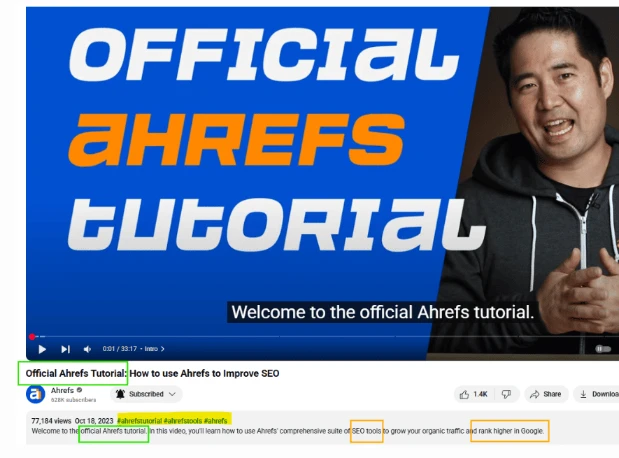
What you’re seeing here is a textbook example of how to optimize a YouTube video for discoverability using a primary keyword, supporting keywords, and hashtags without overdoing it.
The primary keyword is clearly “Ahrefs tutorial.” It’s front and center in the title, spoken right at the start of the video, and repeated in the very first sentence of the description. That consistency tells YouTube exactly what the video is about, which helps it rank better for that phrase.
Then you’ve got secondary keywords like “SEO tools” and “rank higher in Google” worked into the description. These support the main topic by giving it context and relevance. So instead of just ranking for “Ahrefs tutorial,” the video now has a shot at showing up for broader searches related to SEO and Google rankings.
That's a well-thought-out SEO strategy because it expands your reach without diluting your focus.
Finally, the hashtags (#ahrefstutorial, #ahrefstools, #ahrefs) reinforce the topic and help YouTube categorize the video. They don’t carry as much weight as titles or descriptions, but they’re still a helpful signal, especially when you’re targeting branded or niche queries.
Also, notice how the primary keyword is in the thumbnail? Some people may think they’re just restating their description, but it’s all intentional.
If you’re creating your own videos, this is a great format to follow: one clear keyword repeated naturally, a few supporting phrases that match your audience’s intent, and targeted hashtags that round out the package.
Bonus move: If your content covers multiple subtopics, organize them into a playlist. It reinforces the keyword cluster and boosts time-on-channel.
Whatever you do, don’t force keywords. It’s tempting, we know, but avoid keyword stuffing at all costs. If it feels awkward to read, the algorithm will notice, and so will your viewers.
Step 7: Monitor Performance and Refine Your Keyword Strategy
Keyword research doesn’t end when you hit “Publish.” It starts working after your video goes live.
YouTube gives you more than enough data to see what’s working. Dive into YouTube Studio and check:
- Click-through rate (CTR): Are people clicking your video?
- Watch time: Are they sticking around, or bouncing?
- Traffic sources: Is your video showing up in search, on browser pages, or suggested?
- Audience retention: Where exactly are they dropping off?
If your video underperforms, don’t panic. Tweak it:
- Change the title to hit a clearer keyword.
- Rewrite the description to better align with the intended meaning.
- Test a stronger thumbnail to improve your CTR.
And most importantly, keep doing what already worked. Find the keyword that brought in traffic and build more videos around it. From what we’ve seen, that’s how you grow.
You miss it when you think of keyword strategy as static rather than a loop. You should:
Research → Publish → Track → Adjust → Repeat.
8 Free Tools for YouTube Keyword Research
Free tools can be limited, sure. They won’t give you the depth or scale of paid platforms. But that doesn’t mean they can’t be part of your workflow when doing keyword research for YouTube.
At Bluethings, we lean on Pro Tools daily. Still, when we’re validating quick ideas or helping creators build traction, some of these free options can be very helpful too.
Our team rotates through them depending on the niche, the video type, or the stage of the project. They’re also a solid starting point for anyone who’s not quite ready to invest in premium tools but still wants to do things right.
Let’s break them down:
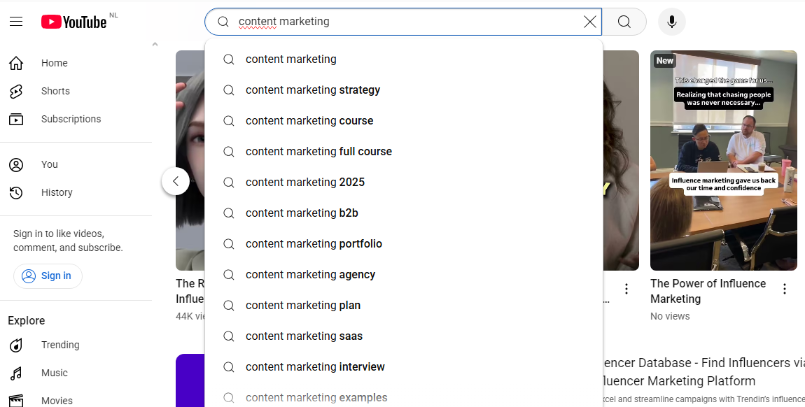
1. YouTube Search Bar (also known as YouTube Search Predictions)
We always start here. YouTube’s autocomplete is the most overlooked free tool out there. Just type a phrase, and you get instant keyword suggestions based on real user searches.
It gives you raw, super-relevant insight into what people are typing in real-time. We use it to:
- Spot long-tail keyword variations
- Discover new angles
- Match phrasing to how real people search.
And it’s built right into YouTube. So, there are no excuses for skipping this powerful tool.
2. Ahrefs YouTube Keyword Research Tool
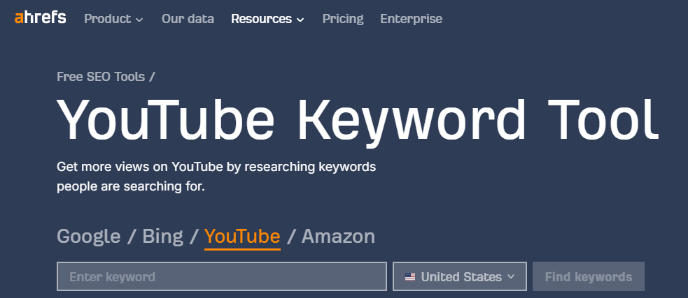
We trust Ahrefs for a lot of things, and their keyword tool for YouTube doesn’t disappoint.
It pulls YouTube-specific data, so you’re not just seeing spillover from Google searches. You get:
- Search volume
- Keyword difficulty
- Related terms for smarter clustering
In short, Ahrefs’ YouTube keyword tool is clean, fast, and great for validating your ideas before you waste time scripting and shooting.
P.S. Ahrefs doesn’t just shine for YouTube. It’s mostly compared to Majestic, but when it comes to all-around SEO, we lean on it for good reason. Want the full breakdown? Check it out here.
3. Ryan Robinson’s Free YouTube Keyword Research Tool
The Ryrob YouTube Keyword Tool has no sign-up. Just drop in a keyword and get a list of related terms, along with search volume and difficulty. You can sort by relevance, which helps when you’re comparing options.
We use it when we want a quick keyword gut check during early research because of how clean and effective it is.
But heads-up: there’s no export function, so you’ll need to take screenshots or notes.

4. KeywordTool.io
Next in our list is KeywordTool.io. This YouTube tool scrapes autocomplete data and turns it into something way more useful.
The real value is in its filters. With them, you can:
- Segment by questions
- Spot hashtags
- Pull in prepositions to understand phrase structure.
It’s perfect for planning series-based content or mapping multiple related videos. The free plan is solid for brainstorming, but if you want search volume, you’ll need the paid tier.
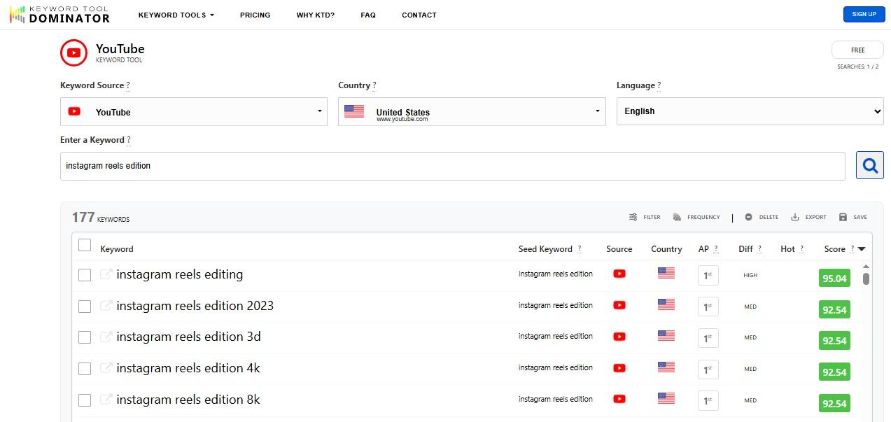
5. Keyword Tool Dominator
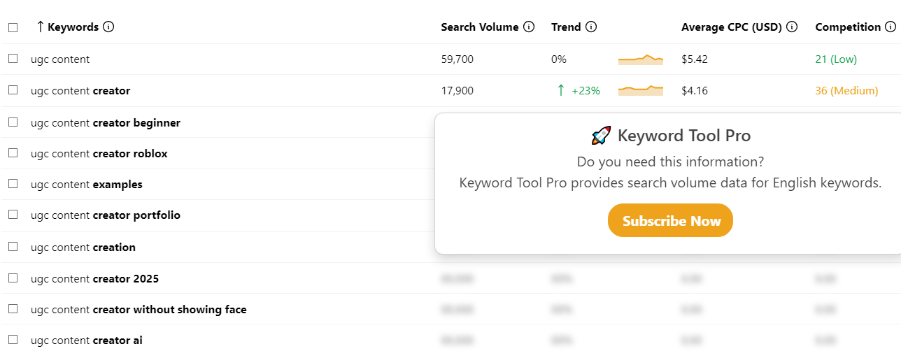
Keyword Tool Dominator is one we keep in our toolkit when we’re looking for long-tail gems that others might miss.
It pulls autocomplete data from YouTube, but what sets it apart is how well it brings up less obvious keyword combos. This makes it great for spotting lower-competition angles.
But there is some downside. You get two free searches per day per IP. But you can get around that with a VPN if you’re doing a heavier session.
It’s especially handy when you’re kicking off a new niche channel and need fast content ideas.
6. TubeRanker
When we need a compact tool that covers multiple bases, TubeRanker often does the trick. Beyond keyword ideas for YouTube, it helps tighten up your whole metadata game.
With this tool, you can get so much done, like:
- Keyword research
- Tag insights
- Title/description suggestions
- Even channel audits
We tap into it when refining metadata or auditing existing videos. On top of that, their hashtag suggestions are a nice add-on when optimizing for discoverability.
Sure, it's not always 100% up to speed with the latest algo shifts. But it's a reliable addition when you need multiple angles in one place.

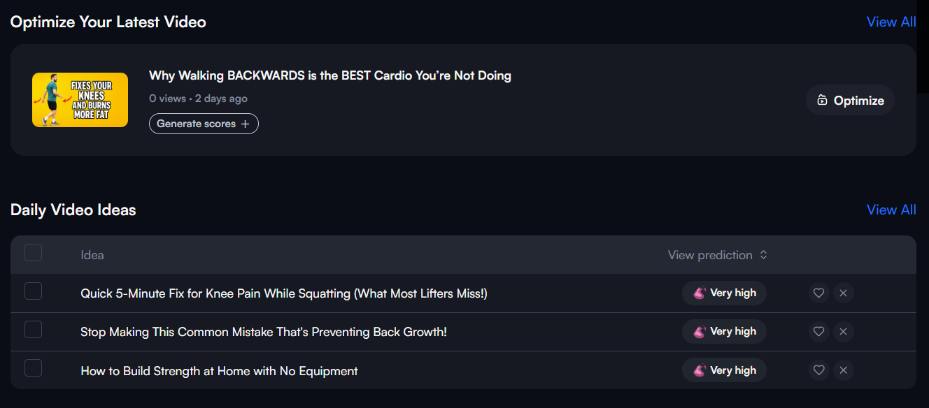
7. VidIQ
For daily YouTube keyword work, the VidIQ Chrome extension is one of those tools that just stays open. It runs right inside YouTube, which makes quick scans and optimizations a breeze. From inside your browser, you get:
- Trending keywords
- Search volume
- Competition scores
- Real-time top opportunities
Their “Rising Keywords” tab is perfect for spotting hot topics before they peak. It’s our go-to when testing titles, building out keyword tags, or tracking early signals. All without ever leaving the YouTube tab.

8. TubeBuddy
TubeBuddy has been part of our workflow for years. It’s a humble tool that focuses more on getting results than having an aesthetic dashboard. Built specifically for YouTube creators, its keyword search tool fits right into our content workflow.
For example, when we’re sharpening a video’s reach, we use it to:
- Scout the competition for your target keyword.
- Find tags that actually move the needle.
- Evaluate keyword value with real SEO scorecards.
- Run quick SEO audits on older videos.
- Track how rankings shift over time.
The weighted scores help you target keywords that match your channel’s size, so you don’t waste time chasing unrealistic wins.

Google Trends for Extra Umph
As we mentioned earlier, Google Trends is also a great and free way to research keywords for YouTube.
The platform provides YouTube data as far back as 2004. Making it possible to plot long-term maps that tell you what keyword trends are fads and which topics stay evergreen.
You can filter for “YouTube Search” to isolate relevant trends to video content rather than blogs or anything else from Google.
We also suggest adding “Breakout” to your filtering to find trends that are quickly gaining traction. So you can be an “early adopter” before trends become oversaturated and die out.
7 Best Practices to Improve YouTube Keyword Targeting
Now that you have your keywords and the tools to go with them, you should make sure no piece of your video content is working against you.
Here’s how we make every keyword count:
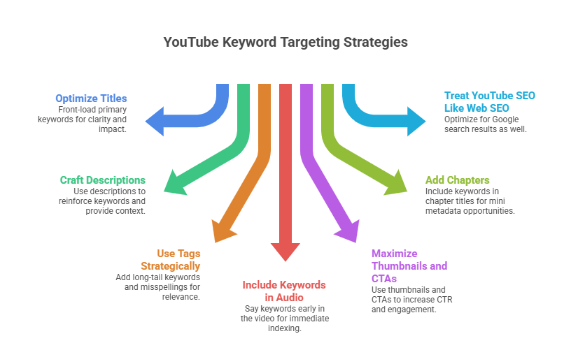
1. Optimize Titles Without Keyword Stuffing
Your video title does the heavy lifting. It’s the first thing people see, and also one of the first things YouTube reads.
So, rule #1: front-load your primary keyword.
- Don’t write: “10 Ways to Build a Remote Career | Work from Home Tips”
- Instead: “Remote Career Tips: 10 Ways to Start Working from Home”
We’ve found that clarity consistently beats cleverness. Viewers should instantly understand what your video offers.
That said, avoid overloading your title or description with every possible keyword. Keep it natural and focused. You get lost when you tryto please search engines and forget you're writing for people before anything else.
New Trend: AI-rewriting tools can help with A/B testing titles as they pool from sources all around the web.
2. Create Engaging and Search-Friendly Descriptions
The video description gives you space to support your title and drop in secondary keywords naturally.
Use the first two lines to:
- Reinforce your primary keyword
- Add context around the topic.
- Drive interest with a clear value promise.
Then, in the rest of the description, build out:
- Supporting keyword clusters
- Timestamps or chapters
- Relevant links (bonus if they align with keyword terms)
We’ve noticed that YouTube relies on description context to place topic clusters. But what’s more, it also helps viewers decide if your video is worth their time.
3. Use Tags Strategically (But Don’t Rely on Them)
Tags might no longer be as powerful as they once were, but they still help clarify keyword intent. That’s doubly true for new videos or new channels.
This is where you might miss potentially your best move. Not using tags to add keyword relevance. This includes:
- Long-tail variations, especially since long-tail keywords are clicked 1.76x more times
- Common misspellings
- Adjacent keyword terms
Don’t obsess over them, but don’t skip them either. Tags are really like keyword support beams, and shouldn’t be the main foundation.
In our experience working with multi-channel teams getting into YouTube, using 5-10 tags max helps you avoid sending tag spam signals to the algorithm.
4. Include Keywords in the First 10 Seconds of Audio
YouTube automatically creates captions and transcripts from your video’s audio.
If you say your target keyword early on, it gets indexed immediately. That’s a free SEO lift, right inside your video content.
It’s a simple fix:
Start your script with a line like, “In this video, we’re breaking down the best YouTube keyword research tools…”
We recommend cross-checking your transcripts in YouTube Studio’s “Caption” tab to correct auto-caption slipups that will affect indexing. If you have the time and personnel, your best bet is creating custom transcripts for your whole video.
5. Maximize Impact with Custom Thumbnails and CTAs
Your thumbnail doesn’t directly affect search engine optimization. But it affects CTR, which does impact how your video ranks.
Use text overlays that match your keyword tone or include variations. Viewers should feel like the thumbnail, title, and description all work together.
And don’t sleep on CTAs. Whether it’s a verbal callout, a pinned comment, or a screen overlay, remind people to take action that increases engagement.
More comments = more signals = more visibility.
6. Add Chapters
Video chapters add extra info to different portions of your video by breaking it into sections. This is good for UX and SEO since each chapter title becomes its own mini metadata opportunity for key search terms.
So when you add chapters, include descriptive keywords in each timestamp label. We’ve found firsthand that this helps videos show up in search snippets or Google SERPs.
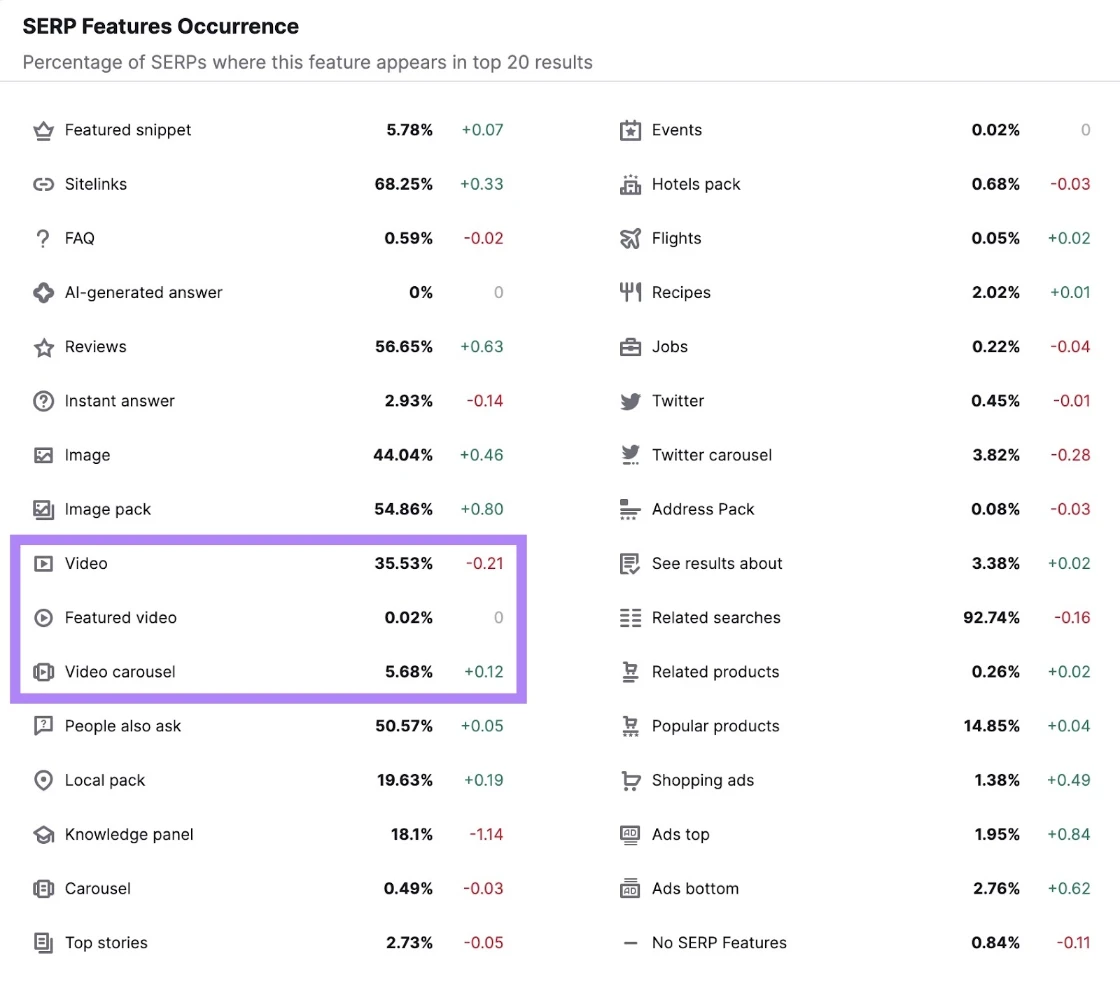
And this matters because about 40% of Google’s SERP features video results, according to a Semrush Sensor survey in 2024. This means you get direct clicks from Google and fortify your entire SEO strategy.
7. Treat YouTube SEO Like Web SEO
Yes, you want to have a crystal clear distinction between your YouTube SEO strategy and your Web SEO strategy. Optimizing for YouTube doesn’t stop at YouTube.
Videos often show up in Google results, particularly for “how to” searches and other informational queries. There’s even a dedicated tab to “videos” in Google search results. This means your keyword strategy should do double duty.
So, structure your content the way you would a solid landing page. Think in terms of hierarchy, clarity, and relevance. Strong metadata helps your video stand out on both ends.
Jenda Perla, VP of Marketing at Kentico, put it clearly in Forbes:
“Don't forget to use SEO for YouTube. First, the right keywords with the title, description, and tags will help you bring more viewers to your videos. Second, SEO will also give you additional visibility in organic Google results, especially for informational search queries. Use your keyword analysis as you would use it for your landing pages or blog posts.”
As per our experience, a good keyword strategy helps you shift from visibility on one platform to two or even more.
5 Common YouTube Keyword Research Mistakes to Avoid
Even with great tools and solid research, a few missteps can tank your visibility. These are the mistakes we see most often, and how to avoid them:
1. Targeting Keywords That Are Either Too Broad or Too Niche
Broad keywords like “fitness” or “productivity” are already dominated by huge content creators. You’re not going to beat them, not yet.
On the flip side, hyper-niche keywords might have zero competition... but also zero search volume.
The win is in the middle:
- High-to-moderate intent
- Specific
- Searchable
- Competitive, but not brutal
The best keyword research services know how to ensure this win.
When you find the balance between reach and precision, your channel starts growing almost on autopilot.
You should also use the tools we’ve seen, like VidIQ and Ahrefs, to validate the keyword difficulty indicators before committing to any one key term.
2. Ignoring Search Intent
Just because a keyword gets search traffic doesn’t mean it matches what your viewers want.
If someone searches “home office setup,” they’re probably looking for visuals, product links, and inspiration. If your video is just you talking into a webcam, you're not matching the intent.
Ask:
- Why would someone search this?
- What are they expecting to find?
- Does my content deliver that?
Keyword alignment means you move from matching just the word to also prioritizing the ‘why’.
For instance:
- Don’t target vague terms like “pool.”
- Do target intent-rich phrases like “how to patch an above-ground pool.”
The second one answers a need. The first one is way too noisy with no clear, definable intent.
You can weigh different “viewer satisfaction” metrics inside YouTube Analytics (within YouTube Studio) by clicking on “Your viewers’ searches” under the Research Tab.
3. Over-Optimizing or Keyword Stuffing
Remember that cramming every keyword you researched into your title and description won’t help. It only makes your content unreadable, and YouTube definitely notices that. You may even get penalized for it.
If your title looks like this:
“How to Start a Business | Start Business Guide | New Business Help.”
It’s already a losing battle.
Instead:
- Use 1 primary keyword in your title
- Use 2–3 secondary keywords in your description.
- Write for humans first, and use metadata to support optimization.
If it sounds forced, it is. And from what we’ve seen with various teams, forced never ranks.
4. Neglecting to Test and Iterate
You don’t just post and pray. You test, tweak, and repeat.
Here’s the mistake most businesses make: They upload a video, then forget it exists, without doing title updates or other important strategic adjustments.
What you should be doing is this:
- Revisit your top performers to identify winning keyword patterns.
- Check underperformers and run A/B tests on thumbnails and titles.
- Use keywords that convert to fuel your next videos.
Keyword performance is such a simple way of getting real-time feedback. You leave views on the table when you ignore them.
Important Note: We understand that 48-72-hour periods are used for initial manual testing in general. However, with YouTube, you have to wait longer before swapping metrics. That’s because
YouTube title and keyword testing works best with longer periods (for example, 14-day windows) on specific, actionable insights (watch-time and shares instead of CTR).
5. Skipping Keyword Tools Entirely
We get it, you’ve got instincts. But instinct can’t replace strategy.
Guessing at keywords is impractical; it’s like driving with your eyes closed. Even free tools like YouTube’s autocomplete feature can reveal search terms you never considered.
So use keyword tools to:
- Avoid blind spots
- Find long-tail terms you missed
- Spot trends before they peak
Even one tool is better than none. Use what you’ve got, and you can grow from there.
That being said, we recommend at least a two-tool cross-verification. This has become best practice because of how inconsistent search volume estimates are across platforms.
Emerging Trends in YouTube Keyword Research
What we’ve noticed lately is that creators are moving away from stuffing high-volume keywords into metadata. Instead, the focus has shifted toward building low-competition keyword ecosystems.
Here’s what you should pay attention to:
- High-volume, low-competition targeting: Instead of chasing broad terms, smaller channels are identifying search demand with weaker competition and capturing easier wins.
- Keyword clustering: One video, one keyword is outdated. Group related long-tail terms under a core topic and build authority through structured coverage.
- Topical ecosystems: Winning channels publish multiple videos around the same subject from different angles. This strengthens relevance signals and improves Suggested visibility.
- AI-assisted optimization: AI speeds up title writing, caption creation, and thumbnail ideation. However, viewers are gravitating toward content that feels deliberate and human.
- Platform quality control: YouTube is tightening distribution for low-effort, mass-upload channels. Posting frequently helps, but retention and relevance drive growth.
- Smarter tool usage: Tools support strategy. They do not replace it. Channels that rely entirely on automation tend to plateau.
Level Up Your YouTube Keyword Strategy With Bluethings
If you're still guessing what your audience wants, you're falling behind.
YouTube keyword research gives you the data edge. It tells you what people are searching, what gaps exist in your niche, and how to structure your video so the algorithm pays attention.
Luckily, you’ve now got the process, the tools, the examples, and know the traps to avoid.
You don’t need a fancy budget or an SEO degree. You just need to:
- Define your angle
- Research smart
- Optimize deliberately
- Track and refine
And remember, this isn’t one-and-done, so you need to test and iterate even after videos are posted. The more you work the loop, the more your videos start pulling their weight.
Ready to level up your video strategy with expert-backed research that goes deeper than what free tools give you?
At Bluethings, we’ve helped brands scale their video views, cut cost-per-clicks, and dominate high-intent search.
Reach out to our team, so we can get started turning your next video into a growth asset.
FAQs
Do keywords matter on YouTube?
Yes, massively. Keywords help YouTube understand what your video is about and who it should be shown to. No keywords means no visibility.
How to research keywords for YouTube?
Start with YouTube’s search bar for real-time suggestions. Then use tools like Ahrefs, VidIQ, and KeywordTool.io to pull traffic estimates, competition, and keyword ideas specific to YouTube.
What Does The Algorithm Prioritize on YouTube?
The algorithm prioritizes viewer satisfaction. This is measured by how long people watch your videos, how often they share them, and other engagement metrics such as likes and comments. It also monitors what users are searching for and clicking on to suggest videos.
But analyzing user behavior goes much deeper than that. It can include dwell times and even your cursor placement.
How can you check keyword search volume on YouTube?
Use YouTube-focused tools like Ahrefs' YouTube Keyword Tool or VidIQ. These give you search volume estimates and ranking difficulty based on YouTube data primarily. This means you entirely avoid Google spillover.
What’s the ideal number of keywords or tags to use on a YouTube video?
Use 1 root keyword and 2–4 secondary ones. For tags, focus on 5–10 relevant hashtags, including variations, long-tail options, and common misspellings.
How to find viral tags for YouTube?
You can use free tools like VidIQ extension or TubeBuddy to track trending tags in your niche. Also, you can scan top-performing videos for a solid list of keyword ideas that are working right now.
How to use keywords to get more YouTube video views?
Map your keywords to every part of your video: title, description, tags, script, and chapters. Use clear, high-intent terms that match what your potential viewers are searching for. And don’t forget your keyword clusters.
How to find high CPM keywords for YouTube?
Look at niches with monetization potential, like finance, B2B software, or health. Use tools to find high-volume keywords in those verticals with solid volume and low competition.